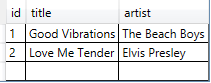
- Defining the DataGrid in XAML
<DataGrid x:Name="dataGrid" />
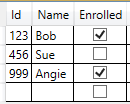
- Bind List of Students to
DataGrid.ItemsSource property
List<Student> students = new List<Student>();
students.Add(new Student { Id = 123, Name = "Bob", Enrolled = true });
students.Add(new Student { Id = 456, Name = "Sue", Enrolled = false });
students.Add(new Student { Id = 999, Name = "Angie", Enrolled = true });
dataGrid.ItemsSource = students;
- Bind DataTable
DataTable table = new DataTable("song");
table.Columns.Add(new DataColumn("id", typeof(int)));
table.Columns.Add(new DataColumn("title", typeof(string)));
table.Columns.Add(new DataColumn("artist", typeof(string)));
table.Columns.Add(new DataColumn("albumImage", typeof(string)));

DataRow row = table.NewRow();
row["id"] = 1;
row["title"] = "Good Vibrations";
row["artist"] = "The Beach Boys";
row["albumImage"] = "http://www.harding.edu/fmccown/images/broncos.gif";
table.Rows.Add(row);

row = table.NewRow();
row["id"] = 2;
row["title"] = "Love Me Tender";
row["artist"] = "Elvis Presley";
row["albumImage"] = "http://www.harding.edu/fmccown/images/cowboys.png";
table.Rows.Add(row);

// Bind the data source
dataGrid.ItemsSource = table.DefaultView;
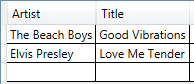
- Manually create columns by setting
AutoGenerateColumns to false
<DataGrid x:Name="dataGrid" AutoGenerateColumns="False">
    <DataGrid.Columns>
        <DataGridTextColumn Binding="{Binding id}" Visibility="Hidden"/>
        <DataGridTextColumn Binding="{Binding artist}" Header="Artist"/>
        <DataGridTextColumn Binding="{Binding title}" Header="Title"/>
    </DataGrid.Columns>
</DataGrid>
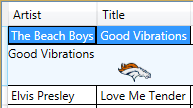
- Details pane
<DataGrid.RowDetailsTemplate>
    <DataTemplate>
        <Border Background="AliceBlue">
            <StackPanel Orientation="Vertical">
                <TextBlock Text="{Binding title}" />
                <Image Source="{Binding albumImage}" />
            </StackPanel>
        </Border>
    </DataTemplate>
</DataGrid.RowDetailsTemplate>
-
Preventing the user from being able to add rows in the DataGrid
<DataGrid CanUserAddRows="False" ... />
-
Make DataGrid read-only
<DataGrid IsReadOnly="True" ... />
- Restrict selections to single row
<DataGrid SelectionMode="Single" ... />
-
Determine which row is selected using
DataGrid.SelectedItem
DataRowView rowView = musicDataGrid.SelectedItem as DataRowView;
if (rowView != null)
{
    // Extract the song ID from the selected song
    int songId = Convert.ToInt32(rowView.Row.ItemArray[0]);
    Console.WriteLine("Selected song " + songId);
}
- Implementing drag-and-drop
private void dataGrid_MouseMove(object sender, MouseEventArgs e)
{
    if (e.LeftButton == MouseButtonState.Pressed &&
        dataGrid.SelectedItems.Count > 0)
    {
        // Get the song ID from the currently selected row
        DataRowView rowView = dataGrid.SelectedItem as DataRowView;
        string songId = rowView.Row.ItemArray[0].ToString();
        Console.WriteLine("Dragging song " + songId);

        // DragDrop.DoDragDrop
    }
}