- The app lifecycle are the states a UWP app goes through when executed, navigated away from, and terminated
- Figure borrowed from article Windows 10 universal Windows platform (UWP) app lifecycle
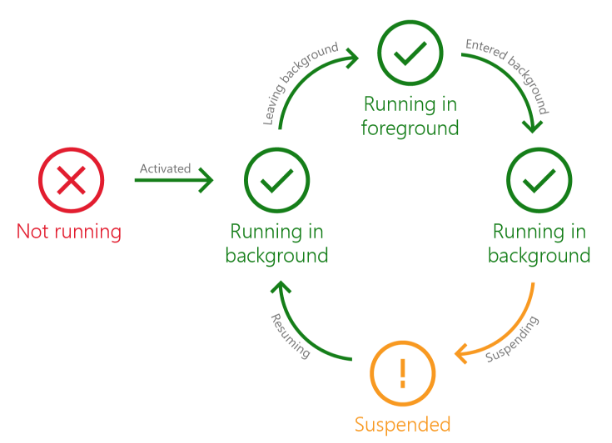
- UWP apps have four states:
- NotRunning - Has not been launched or was once Suspended and could not be kept in memory
- Running in background - Default state that an app is launched, activated, or resumed into or when app is minimized or another app has the focus; UI is not visible
- Running in foreground - Splash screen is removed, and UI is visible
- Suspended - App in background state for N seconds and not doing anything; app remains in memory unless OS needs more
- App events:
- Activated - Splash screen is displayed
- LeavingBackground - App is leaving background state and about to run in foreground
- EnteredBackground - App is entering background state; may save state if app is doing background work
- Suspending - App is moving to Suspended state; app should save relevant app and user data in case user or OS closes app
- Resuming - User switches to app or device comes out of a low power state
- Demo to see events occuring - run in Debug mode and watch debug Output window in VS
// From App.xaml.cs sealed partial class App : Application { public App() { this.InitializeComponent(); this.Suspending += OnSuspending; // Add event handlers this.EnteredBackground += App_EnteredBackground; this.LeavingBackground += App_LeavingBackground; this.Resuming += App_Resuming; } private void App_Resuming(object sender, object e) { Debug.WriteLine("Resuming"); } private void App_LeavingBackground(object sender, LeavingBackgroundEventArgs e) { Debug.WriteLine("LeavingBackground"); } private void App_EnteredBackground(object sender, EnteredBackgroundEventArgs e) { Debug.WriteLine("EnteredBackground"); } ... private void OnSuspending(object sender, SuspendingEventArgs e) { Debug.WriteLine("Suspending"); ... } } - CRASH! - If app stops responding or generates an exception, Windows asks the user for consent to send a problem report to Microsoft
- Apps should restore their UI state so the user's work is not lost
- Session data vs. app data
- Session data - temporary data that is relevant to the user’s current session
- Examples
- News item user is reading in news app
- User's placement of tiles during one move in Scrabble game
- Should be restored if user navigates back to app
- A session ends when the user closes the app, logs off, or reboots the computer
- Usually saved when enabling
NavigationCacheMode
- Examples
- App data - data that is persistent across sessions and must always be
accessible to the user
- Examples
- User's preferred news categories
- Score of all ongoing Scrabble games
- Should be restored after app is closed and restarted
- Could be stored on the local machine (
LocalSettings) or in the cloud (RoamingSettings) so the data is accessible to the same user on different machines
- Examples
- Session data - temporary data that is relevant to the user’s current session
- Saving app data with ApplicationData class
- LocalFolder for saving app data in files on the device
- LocalSettings for saving key-value pairs on the device
- RoamingFolder for saving app data files in the cloud; data is accessible on different devices to same user
- RoamingSettings for saving key-value pairs in the cloud
- Other:
LocalCacheFolder,TemporaryFolder,SharedLocalFolder
- OnSuspending() method in App.xaml.cs called when suspending
- Save the navigation state
private void OnSuspending(object sender, SuspendingEventArgs e) { var deferral = e.SuspendingOperation.GetDeferral(); //TODO: Save application state and stop any background activity Frame frame = Window.Current.Content as Frame; ApplicationData.Current.LocalSettings.Values["NavigationState"] = frame.GetNavigationState(); deferral.Complete(); }- Calling
GetNavigationState()causesOnNavigatedFrom()to be called when the app is terminated, which is ideal for saving the form's state - Warning: Calls to
Frame.Navigate()must either pass no second parameter or a second parameter that is a primitive type like string, char, int, etc. If the parameter is an object, an exception will be thrown because the object cannot be serialized automatically byGetNavigationState().
- Calling
- Restore navigation state in
OnLaunched()so when app returns to same page when brought back to Running stateprotected override void OnLaunched(LaunchActivatedEventArgs e) { // Skip... if (e.PreviousExecutionState == ApplicationExecutionState.Terminated) { //TODO: Load state from previously suspended application rootFrame.SetNavigationState((string)ApplicationData.Current.LocalSettings.Values["NavigationState"]); } // Skip... } - Save app data in LocalSettings when navigating away from page (
OnNavigatedFrom()is called when app is suspended)protected override void OnNavigatedFrom(NavigationEventArgs e) { ApplicationData.Current.LocalSettings.Values["username"] = username; } - Restore app data when navigating to the page in
OnNavigatedTo()protected override void OnNavigatedTo(NavigationEventArgs e) { if (ApplicationData.Current.LocalSettings.Values.ContainsKey("username")) { string username = ApplicationData.Current.LocalSettings.Values["username"] as string; } } - Multiple values can be stored in an ApplicationDataCompositeValue object
// In OnNavigatedFrom
var composite = new ApplicationDataCompositeValue();
composite["field1"] = textBox1.Text;
composite["field2"] = textBox2.Text;
ApplicationData.Current.LocalSettings.Values["pageState"] = composite;
// In OnNavigatedTo
var composite = ApplicationData.Current.LocalSettings.Values["pageState"] as ApplicationDataCompositeValue;
textBox1.Text = composite["field1"] as string;
textBox2.Text = composite["field2"] as string;
- To clear the state on a new navigation, check e.NavigationMode
protected override void OnNavigatedTo(NavigationEventArgs e)
{
	if (e.NavigationMode == NavigationMode.New)
	{
		// Disregard saved state
		ApplicationData.Current.LocalSettings.Values.Remove("pageState");
	}
	else if (ApplicationData.Current.LocalSettings.Values.ContainsKey("pageState"))
	{
		// Restore saved state
		var composite = ApplicationData.Current.LocalSettings.Values["pageState"] as ApplicationDataCompositeValue;
		textBox1.Text = composite["field1"] as string;
		textBox2.Text = composite["field2"] as string;
	}
}
- Run debugger (F5)
- Select an option from the debugger
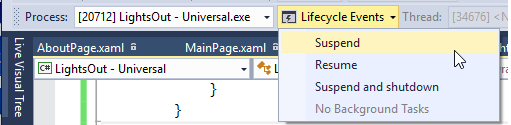
- Select Suspend and shutdown so the Suspending event occurs and state management code is executed
- Press F5 to see state restored
- If you stop the debugger (Debug > Stop Debugging),
and restart,
LaunchActivatedEventArgs.PreviousExecutionStateinOnLaunched()will beClosedByUser, soSetNavigationState()not called
- Most apps need to save the state of various objects
- Serialization is the process of converting an object into some other representation (text or binary) that can be used to later restore the object
- Deserialization is the process of restoring a serialized object back to its original form
- Json.NET
is a popular library for serializing objects with JSON
- Install Json.NET using nuget
PM> Install-Package Newtonsoft.Json
- Serialize/deserialize example
Student stu = new Student();
stu.Name = "Bob";
stu.Gpa = 3.5;

// Serialize object
string json = JsonConvert.SerializeObject(stu);

// Deserialize
Student newStu = JsonConvert.DeserializeObject<Student>(json);
- Only public properties are read/written, so must add properties to properly serialize private data
- Store the serialized object in
OnNavigatedFromand deserialize inOnNavigatedTo
- Install Json.NET using nuget