- DOM is a tree structure of the HTML document displayed in the browser; componsed of nodes
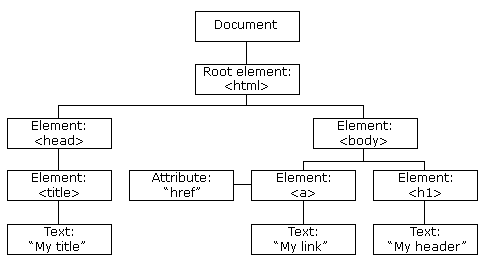
documentis the HTML document being displayed by the browserlastModified- document's last modified date on the web serverdocument.writeln(document.lastModified); // 08/23/2012 13:38:53title- title of the documentURL- URL of the document- Complete list of properties and methods
- The DOM contains several collections, groups of related objects on a page
images- All images on the pagelinks- All links on the pageforms- All forms on the pageanchors- All anchors on the page that usenameattribute
- Example which swaps out the first image on the web page with another
document.images[0].src = "newimage.png"; - Example changing the link target
<a href="http://www.harding.edu/">3rd link on this page</a>// Link changed to point to Google's website document.links[2].href = "http://www.google.com/";
getElementById('id')- search by ID, returns the element with the same ID or null if not found<a href="http://www.harding.edu/" id="mylink">my link</a>var link = document.getElementById("mylink"); link.href = "http://www.google.com/";getElementsByTagName('tag')- search by tag, returns a list of elements with the given tag namevar lineItems = document.getElementsByTagName("li"); lineItems[0].style.color = "blue"; // Change font color of first <li> to bluegetElementsByClassName('class')- search by CSS class name, returns a list of elements with the given class namevar outlines = document.getElementsByClassName("outline");querySelector('css-selector')- search by CSS selector, returns the first matching element or null if not found// Returns first element using "special" class var elem = document.querySelector(".special"); // Returns form with id="reg-form" var form = document.querySelector("#reg-form");querySelectorAll('css-selector')- search by CSS selector, returns a list of elements that match or null if not found// Returns all < div> elements var divs = document.querySelectorAll("div");
innerHTMLproperty to change an element's contentsvar message = document.getElementById("message"); message.innerHTML = "Something new...";<!-- Becomes <h1 id="message">Something new...</h1> --> <h1 id="message">This is a test</h1>createElement(),createTextNode(),appendChild()methods to create a new DOM node andinsertBefore()to add the node to the DOM// Create <h1>Greetings!</h1> var newHeader = document.createElement("h1"); var newContent = document.createTextNode("Greetings!"); newHeader.appendChild(newContent); // Add new <h1> before the outline node var outline = document.getElementById("outline"); document.body.insertBefore(newHeader, outline);- Remove a DOM node with
remove()method// Remove entire outline from web page var outline = document.getElementById("outline"); outline.remove(); - Get/set element attributes using DOM node properties
// Get link's URL let url = document.getElementById("nasa_link").href; // Change link's URL document.getElementById("nasa_link").href = "https://www.spacex.com/" - Remove element attributes with
removeAttribute()method// Remove target attribute document.getElementById("nasa_link").removeAttribute("target")